联系电话:0411-66373325
联系地址:大连市沙河口区富民广场
公司邮箱:2058793689@qq.com
备案信息:Copyright © 2016-2025,www.my249.com,All rights reserved

|
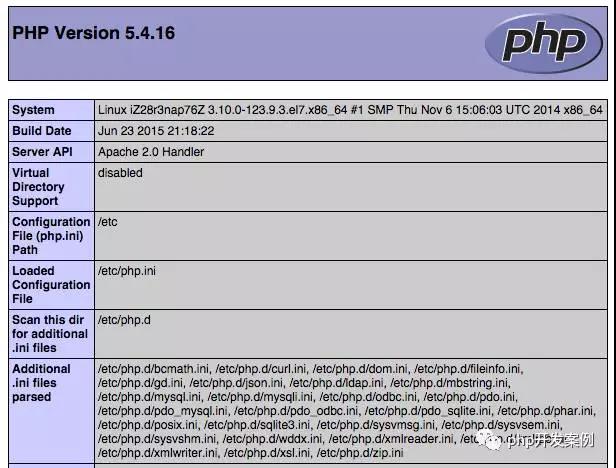
249建站之家:Centos7安装配置Apache+PHP+Mysql+phpmyadmin一、安装Apache yum install httpd 安装成功后,Apache操作命令: systemctl start httpd //启动apachesystemctl stop httpd //停止apachesystemctl restart httpd //重启apachesystemctl enable httpd //设置apache开机启动 异常处理 我再阿里云上配置并出现启动Apache后无法访问的问题,但是一般服务器访问Apache可能需要如下操作: (1)在防火墙中开放80端口 现在需要将 http 服务加入防火墙以允许外部访问, firewall-cmd --add-service=http --permanent –permanent 参数表示这是一条永久防火墙规则,如果不加则重启系统后就没有这条规则了。 而对于自定义的端口(如81),也需要添加防火墙规则, firewall-cmd --zone=public --add-port=81/tcp --permanent 重启 Firewalld 使该规则生效, systemctl restart firewalld (2)关闭SELINUX vi /etc/selinux/config 注释掉如下两句,添加最后一项 \#SELINUX=enforcing #注释掉\#SELINUXTYPE=targeted #注释掉SELINUX=disabled #增加 :wq! 保存退出 输入如下命令 setenforce 0 #使配置立即生效 二、 安装MariaDB (MySQL的一个开源分支) yum install mariadb mariadb-server MariaDB安装成功后,需要配置MySQL的root密码,此外,备注一下启动关闭MariaDB的常用命令 systemctl start mariadb //启动MariaDBsystemctl stop mariadb //停止MariaDBsystemctl restart mariadb //重启MariaDBsystemctl enable mariadb //设置开机启动 设置root账户密码 mysql_secure_installation Enter current password for root (enter for none): Set root password? [Y/n] 点击回车然后提示是否设置root账号密码,输入y New password: Re-enter new password: Password updated successfully! 提示输入新密码和重复输入新密码,重复输入两次后,出现更新密码成功提示。 然后一路输入y就可以。 Remove anonymous users? [Y/n] y ... Success! Disallow root login remotely? [Y/n] y ... Success! Remove test database and access to it? [Y/n] y - Dropping test database... ... Success! - Removing privileges on test database... ... Success! Reload privilege tables now? [Y/n] y ... Success! Thanks for using MariaDB! 设置root密码后,重启MariaDB生效 systemctl restart mariadb.service 测试访问数据库: mysql -uroot -p 然后输入密码,登录成功后显示如下: Enter password: Welcome to the MariaDB monitor. Commands end with ; or \g. Your MariaDB connection id is 2 Server version: 5.5.44-MariaDB MariaDB Server Copyright (c) 2000, 2015, Oracle, MariaDB Corporation Ab and others. Type 'help;' or '\h' for help. Type '\c' to clear the current input statement. MariaDB [(none)]> 输入如下命令,查看数据库服务器的数据库 show databases; 退出命令: exit; 三、安装PHP以及PHP拓展 yum install php php-mysql php-gd libjpeg* php-ldap php-odbc php-pear php-xml php-xmlrpc php-mbstring php-bcmath php-mhash 安装完成后,重启Apache服务器 systemctl restart httpd.service 测试PHP安装结果 vi /var/www/html/index.php 输入如下内容 <?php phpinfo();?> 输入:wq! 保存退出 在浏览器中输入服务器地址,查看是否可以看到:
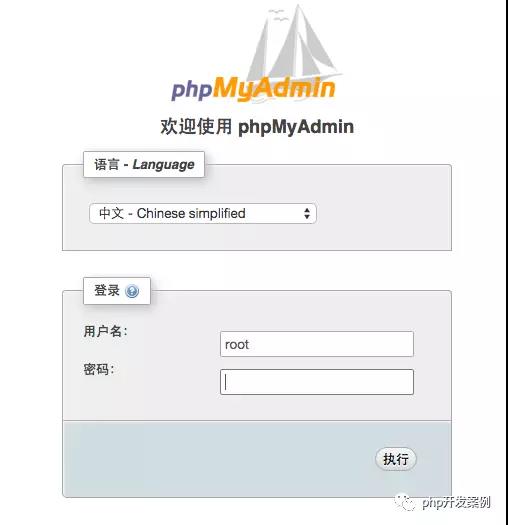
页面效果 四、安装phpmyadmin 使用yum安装phpmyadmin yum install phpmyadmin php-mcrypt phpMyAdmin 的默认安装目录是 /usr/share/phpMyAdmin,同时会在 Apache 的配置文件目录中自动创建虚拟主机配置文件 /etc/httpd/conf.d/phpMyAdmin.conf(区分大小写)。默认情况下,CentOS 7上的phpMyAdmin只允许从回环地址(127.0.0.1)访问。为了能远程连接,你需要改动它的配置。 vi /etc/httpd/conf.d/phpMyAdmin.conf 修改配置文件,如下: <Directory /usr/share/phpMyAdmin/> AddDefaultCharset UTF-8 <IfModule mod_authz_core.c> # Apache 2.4 <RequireAny> # Require ip 127.0.0.1 #注释掉 # Require ip ::1 #注释掉 Require all granted #新添加 </RequireAny> </IfModule> <IfModule !mod_authz_core.c> # Apache 2.2 Order Deny,Allow Deny from All Allow from 127.0.0.1 Allow from ::1 </IfModule></Directory><Directory /usr/share/phpMyAdmin/setup/> <IfModule mod_authz_core.c> # Apache 2.4 <RequireAny> #Require ip 127.0.0.1 #注释掉 #Require ip ::1 #注释掉 Require all granted #新添加 </RequireAny> </IfModule> <IfModule !mod_authz_core.c> # Apache 2.2 Order Deny,Allow Deny from All Allow from 127.0.0.1 Allow from ::1 </IfModule></Directory> 然后重启Apache服务器 systemctl restart httpd 然后就可以通过浏览器访问http://服务器ip地址/phpmyadmin访问
访问phpmyadmin页面 |