联系电话:0411-66373325
联系地址:大连市沙河口区富民广场
公司邮箱:2058793689@qq.com
备案信息:Copyright © 2016-2025,www.my249.com,All rights reserved

|
249建站之家:iOS百度地图反编码个人见解
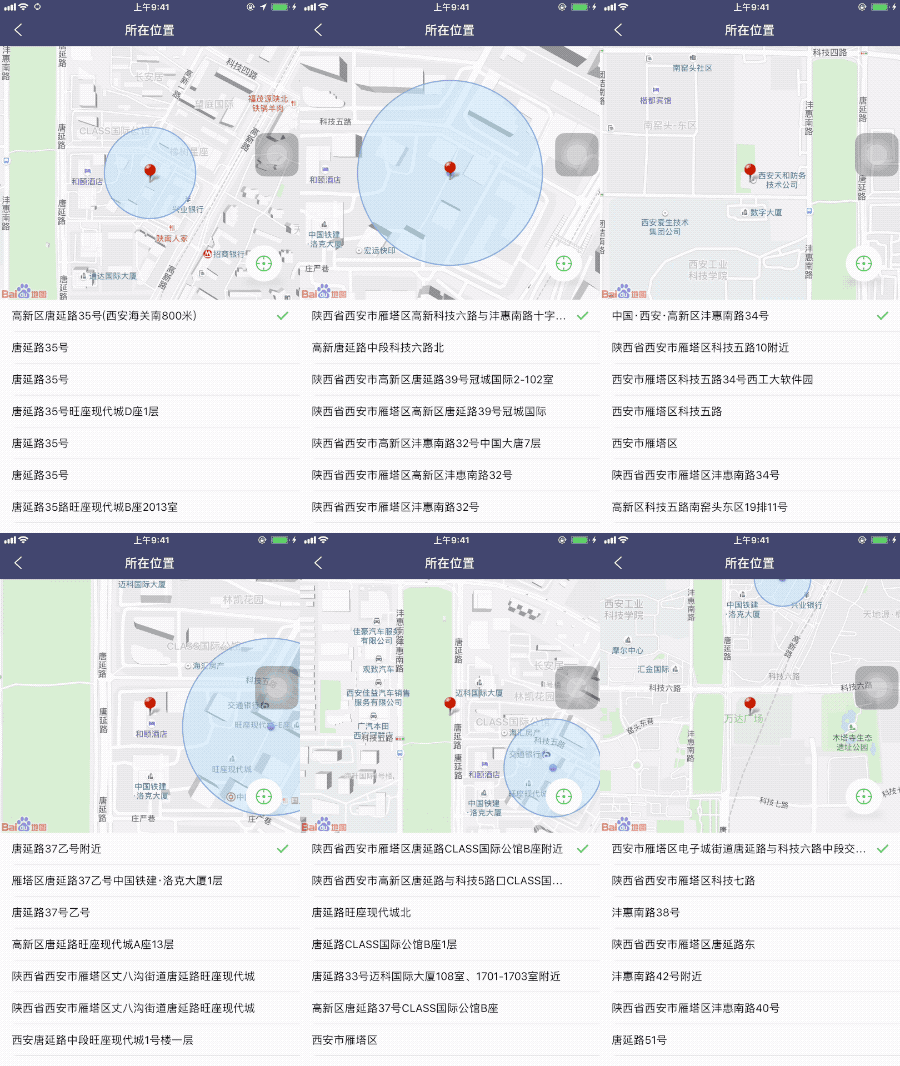
类似于微信中的发送位置,拖拽从新定位,以及反编码,列表附近的位置。 思路就是将一个UIImageView固定在地图中间,每次更新位置,给UIImageView添加动画即可。 代码如下: #import "FTBasicController.h" typedef void (^SelectBlock) (NSString *address,CLLocationCoordinate2D select); @interface FTUploadAddressController : FTBasicController @property(nonatomic, copy)SelectBlock selectBlock; @end #import "FTUploadAddressController.h" #import "FTBMKPoiInfo.h" #import "FTPoiCell.h" @interface FTUploadAddressController ()<BMKMapViewDelegate,BMKLocationServiceDelegate,UITableViewDelegate,UITableViewDataSource,BMKGeoCodeSearchDelegate> @property(nonatomic,strong)BMKLocationService *locService; @property(nonatomic,strong)BMKUserLocation *userLocation; @property(nonatomic,strong)BMKMapView *mapView; @property(nonatomic,strong)UITableView *tableview; @property(nonatomic,strong)BMKGeoCodeSearch *geocodesearch; @property(nonatomic,strong)UIImageView *loactionView; @property(nonatomic,strong)NSMutableArray *dataA; @property(nonatomic,strong)LxButton *poiBackBtn; @property(nonatomic,assign)CLLocationCoordinate2D selectedCoordinate; @property(nonatomic,strong)NSString *selectAddress; @end @implementation FTUploadAddressController -(void)viewWillAppear:(BOOL)animated{ [super viewWillAppear:animated];
self.fd_interactivePopDisabled = YES;
if (!([CLLocationManager authorizationStatus] == kCLAuthorizationStatusAuthorizedAlways || [CLLocationManager authorizationStatus] == kCLAuthorizationStatusAuthorizedWhenInUse) &&[CLLocationManager authorizationStatus] != kCLAuthorizationStatusNotDetermined){ [self judgeOpenlocation]; }else{ [_mapView viewWillAppear]; _mapView.delegate = self; // 此处记得不用的时候需要置nil,否则影响内存的释放
_locService.delegate = self; _geocodesearch.delegate = self; // 此处记得不用的时候需要置nil,否则影响内存的释放 _mapView.showsUserLocation = NO;//先关闭显示的定位图层 _mapView.userTrackingMode = 0; _mapView.showsUserLocation = YES;//显示定位图层
[self.locService startUserLocationService];
}
} -(void)judgeOpenlocation{
UIAlertController *alertVC = [UIAlertController alertControllerWithTitle:@"打开[定位服务]来允许[应用名字]确定您的位置" message:@"请在系统设置中开启定位服务(设置>隐私>定位服务>应用名字>始终)" preferredStyle:UIAlertControllerStyleAlert]; [alertVC addAction:[UIAlertAction actionWithTitle:@"取消" style:UIAlertActionStyleCancel handler:nil]]; [alertVC addAction:[UIAlertAction actionWithTitle:@"去设置" style:UIAlertActionStyleDefault handler:^(UIAlertAction * _Nonnull action) {
if ([[[UIDevice currentDevice] systemVersion] floatValue] >= 10.000000) { //跳转到定位权限页面 NSURL *url = [NSURL URLWithString:UIApplicationOpenSettingsURLString]; if( [[UIApplication sharedApplication]canOpenURL:url] ) { [[UIApplication sharedApplication] openURL:url]; } }else { //跳转到定位开关界面 NSURL *url = [NSURL URLWithString:@"prefs:root=LOCATION_SERVICES"]; if( [[UIApplication sharedApplication]canOpenURL:url] ) { [[UIApplication sharedApplication] openURL:url]; } } }]]; [self presentViewController:alertVC animated:YES completion:nil];
} -(void)viewWillDisappear:(BOOL)animated { self.fd_interactivePopDisabled = NO; [_mapView viewWillDisappear]; _mapView.delegate = nil; // 不用时,置nil [self.locService stopUserLocationService]; _geocodesearch.delegate = nil; // 不用时,置nil _locService.delegate = nil;
} - (void)viewDidLoad { [super viewDidLoad]; // Do any additional setup after loading the view. self.title = @"所在位置";
self.locService = [[BMKLocationService alloc]init]; self.geocodesearch = [[BMKGeoCodeSearch alloc]init]; [self setup];
self.navigationItem.leftBarButtonItem =[[UIBarButtonItem alloc]initWithImage:[[UIImage imageNamed:@"return"]imageWithRenderingMode:UIImageRenderingModeAlwaysOriginal] style:UIBarButtonItemStylePlain target:self action:@selector(backReturn)]; } -(void)backReturn{ if (self.selectBlock) { self.selectBlock(self.selectAddress, self.selectedCoordinate); [self.navigationController popViewControllerAnimated:YES]; } } -(void)setup{ [self.view addSubview:self.mapView];
[self.view addSubview:self.tableview];
[self.mapView addSubview:self.loactionView];
[self.mapView addSubview:self.poiBackBtn];
[self.poiBackBtn LX_SetShadowPathWith:[UIColor grayColor] shadowOpacity:0.5 shadowRadius:5 shadowSide:LXShadowPathBottom shadowPathWidth:3];
FTWS(weakSelf); [self.poiBackBtn addClickBlock:^(UIButton *button) {
[weakSelf.mapView setCenterCoordinate:weakSelf.userLocation.location.coordinate];
}]; } - (void)didUpdateBMKUserLocation:(BMKUserLocation *)userLocation { // NSLog(@"didUpdateUserLocation lat %f,long %f",userLocation.location.coordinate.latitude,userLocation.location.coordinate.longitude); [_mapView updateLocationData:userLocation];
self.userLocation = userLocation;
[self.mapView setCenterCoordinate:userLocation.location.coordinate];
BMKReverseGeoCodeOption * option = [[BMKReverseGeoCodeOption alloc]init]; option.reverseGeoPoint = userLocation.location.coordinate; BOOL flag = [_geocodesearch reverseGeoCode:option];
if (flag) {
}
//更新位置之后必须停止定位, [_locService stopUserLocationService];
} -(void)mapView:(BMKMapView *)mapView regionDidChangeAnimated:(BOOL)animated{
NSLog(@"地图拖动"); [UIView animateWithDuration:0.30 animations:^{ self.loactionView.centerY -=8; } completion:^(BOOL finished) { self.loactionView.centerY +=8; }];
CGPoint touchPoint = self.mapView.center;
CLLocationCoordinate2D touchMapCoordinate = [self.mapView convertPoint:touchPoint toCoordinateFromView:self.mapView];//这里touchMapCoordinate就是该点的经纬度了 NSLog(@"touching %f,%f",touchMapCoordinate.latitude,touchMapCoordinate.longitude);
//选择的上传地址 self.selectedCoordinate = touchMapCoordinate; BMKReverseGeoCodeOption * option = [[BMKReverseGeoCodeOption alloc]init]; option.reverseGeoPoint = touchMapCoordinate; BOOL flag = [_geocodesearch reverseGeoCode:option]; if (flag) {
}
} #pragma mark---获取反编码的数据--- -(void)onGetReverseGeoCodeResult:(BMKGeoCodeSearch *)searcher result:(BMKReverseGeoCodeResult *)result errorCode:(BMKSearchErrorCode)error { BMKAddressComponent *component=[[BMKAddressComponent alloc]init]; component=result.addressDetail;
[self.dataA removeAllObjects];
for (int i =0; i< result.poiList.count; i++) { BMKPoiInfo *info = result.poiList[i]; FTBMKPoiInfo *ftInfo =[[FTBMKPoiInfo alloc]init]; ftInfo.address = info.address; ftInfo.seleced = NO; if (i == 0) { ftInfo.seleced = YES; self.selectAddress = ftInfo.address; } [self.dataA addObject:ftInfo]; } [self.tableview reloadData]; } #pragma mark--- 定位的方法-- - (void)didUpdateUserHeading:(BMKUserLocation *)userLocation { [_mapView updateLocationData:userLocation]; // NSLog(@"heading is %@",userLocation.heading); } -(BMKMapView *)mapView{ if (!_mapView) { _mapView =[[BMKMapView alloc]initWithFrame:CGRectMake(0, NAVH, Device_Width, 350)]; _mapView.zoomLevel = 18; _mapView.minZoomLevel = 3; _mapView.maxZoomLevel = 21; // BMKLocationViewDisplayParam *displayParam = [[BMKLocationViewDisplayParam alloc]init]; // displayParam.isRotateAngleValid = true;//跟随态旋转角度是否生效 // displayParam.isAccuracyCircleShow = false;//精度圈是否显示 // displayParam.locationViewOffsetX = 0;//定位偏移量(经度) // displayParam.locationViewOffsetY = 0;//定位偏移量(纬度) // [_mapView updateLocationViewWithParam:displayParam];
} return _mapView; } -(NSInteger)tableView:(UITableView *)tableView numberOfRowsInSection:(NSInteger)section{ return self.dataA.count; } -(UITableViewCell *)tableView:(UITableView *)tableView cellForRowAtIndexPath:(NSIndexPath *)indexPath{ FTPoiCell *cell =[tableView dequeueReusableCellWithIdentifier:@"cell" forIndexPath:indexPath]; if (!cell) { cell =[[FTPoiCell alloc]initWithStyle:UITableViewCellStyleDefault reuseIdentifier:@"cell"]; } FTBMKPoiInfo *info = self.dataA[indexPath.row]; cell.info = info; return cell; } -(void)tableView:(UITableView *)tableView didSelectRowAtIndexPath:(NSIndexPath *)indexPath{ [tableView deselectRowAtIndexPath:indexPath animated:YES];
FTBMKPoiInfo *info = self.dataA[indexPath.row]; self.selectAddress = info.address;
[self.dataA enumerateObjectsUsingBlock:^(FTBMKPoiInfo * obj, NSUInteger idx, BOOL * _Nonnull stop) {
if (obj == info) { obj.seleced = YES; }else{ obj.seleced = NO; }
[self.tableview reloadData]; }];
if (self.selectBlock) { self.selectBlock(self.selectAddress,self.selectedCoordinate);
[self.navigationController popViewControllerAnimated:YES]; }
} -(UITableView *)tableview{
if (!_tableview) { _tableview =[[UITableView alloc]initWithFrame:CGRectMake(0, self.mapView.bottom, Device_Width, Device_Height - self.mapView.bottom) style:UITableViewStylePlain]; _tableview.delegate = self; _tableview.dataSource = self; _tableview.showsVerticalScrollIndicator = NO; _tableview.showsHorizontalScrollIndicator = NO; _tableview.tableFooterView = [UIView new]; _tableview.rowHeight = 44; [_tableview registerNib:[UINib nibWithNibName:@"FTPoiCell" bundle:nil] forCellReuseIdentifier:@"cell"]; // [_tableview registerClass:[UITableViewCell class] forCellReuseIdentifier:@"cell"];
} return _tableview; } -(NSMutableArray *)dataA{ if (!_dataA) { _dataA =[NSMutableArray array]; } return _dataA; } -(UIImageView *)loactionView{ if (!_loactionView) { _loactionView =[[UIImageView alloc]initWithImage:[UIImage imageNamed:@"ditu_red"]]; _loactionView.center = CGPointMake(self.mapView.width/2, self.mapView.height/2);
} return _loactionView; } -(LxButton *)poiBackBtn{ if (!_poiBackBtn) { _poiBackBtn =[LxButton LXButtonWithTitle:nil titleFont:nil Image:nil backgroundImage:nil backgroundColor:[UIColor whiteColor] titleColor:nil frame:CGRectMake(Device_Width - 75, self.mapView.height - 75, 50, 50)]; [_poiBackBtn setFTCornerdious:25]; UIImageView *imageView =[[UIImageView alloc]initWithImage:[UIImage imageNamed:@"poi_back"]];
imageView.center = CGPointMake(25, 25); [_poiBackBtn addSubview:imageView];
} return _poiBackBtn; } @end |